US Public Weather
- 3.7
- Rating
- 100.00K
- Installs
- Free
- Price
 Analysis by App-foxy
I usually judge a weather app by what happens when I need an answer quickly, not by how impressive its forecast screen looks in perfect conditions. US Public Weather takes a practical route: it focuses on United States weather forecasts, alerts, and radar using National Weather Service data. That makes it especially interesting for people who want public weather information rather than a heavily styled global weather service.
After spending time with it, my impression is that this is a focused tool for checking conditions, watching developing weather, and keeping an eye on official alerts. It is free to start, rated for Everyone, and developed by MeteorologyMan. The app has passed the early trial stage of a new release, having arrived on April 12, 2023, and its current version is 2.51. Its audience is already fairly substantial, with more than one hundred thousand installs, although its average rating sits at 3.7 from roughly four hundred ratings.
How the app feels when the network matters
The most important thing to understand is that this is a connected weather experience. Forecasts, radar views, and alerts are the kind of information that depend on current data, so the quality of the moment-to-moment experience is tied to your connection and to the availability of the underlying weather service. That is not a criticism unique to this app; it is simply the reality of live weather information. Still, it changes how I use it.
You May Also Like

 Blood Strike: 2.5 Anniversary
Blood Strike’s Loadouts Turn Every Drop Into a Tactical Gamble
A close look at Blood Strike’s custom loadouts: how fast access to signature weapons reshapes its battle royale rhythm, rewards preparation, and narrows the gap between fights.

 Pandora - Music & Podcasts
Pandora’s Music Is Easy to Start, but Harder to Recover
Pandora’s strength is its low-effort path from a seed to a station. Its weak spot is how much confidence it asks you to place in connection, setup, and quiet recovery.

 8 Ball Pool
 Is Built on Rivalries, Rematches, and Routine
A close look at the rivalries, rematches, shared routines, and unanswered safety questions that turn a quick pool match into a persistent mobile community.

 Samsung Music
’s Quiet Strength Is Playing What You Already Own
Its reach comes less from spectacle than from dependable access to a personal library. That simplicity is both the app’s strongest retention engine and its ceiling.

 AccuWeather: Weather Radar
AccuWeather Review: A Quick, Clear Forecast for Everyday Decisions
For everyday plans, the best forecast is the one you can understand quickly. AccuWeather makes rain timing, radar, and local conditions easy to act on, with a few trade-offs.

 Hill Climb Racing
Why Hill Climb Racing Still Turns Crashes Into One More Run
A tiny car, a bumpy hill and one more upgrade: Hill Climb Racing keeps resurfacing because its simple chaos makes every near-miss feel personal.
More From Our News Desk



When I open the app at home on a stable connection, it is well suited to a quick planning routine. I can check what the day looks like, look for signs of changing conditions, and pay attention to alerts without navigating a large collection of unrelated lifestyle features. The National Weather Service foundation is a meaningful advantage for users who prefer official US weather information over a forecast presented mainly as a polished visual estimate.
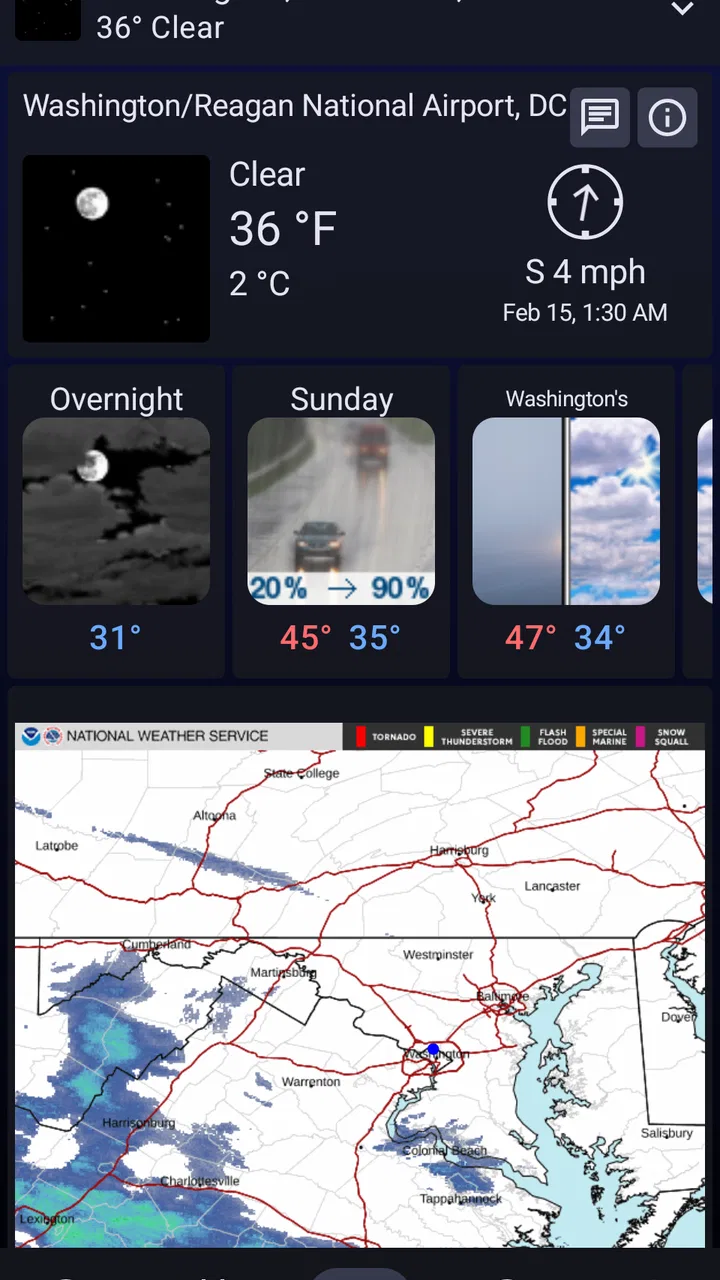
The radar side becomes more useful when the forecast is not enough. A daily temperature summary may tell me that rain is possible, but radar helps me think about what is happening nearby and whether a shower is moving toward my area. That distinction matters when I am deciding whether to leave now, wait a little, take an umbrella, or change an outdoor plan entirely.
There is also a trade-off here. A weather app built around current public data is not something I would treat like a static reference book. If I am in a basement, on a rural road with weak reception, or inside a building where mobile data struggles, I would not assume that the newest forecast or radar picture will be immediately available. My habit is to check important information before leaving rather than waiting until the last possible minute.
A realistic morning and commute routine
Imagine a weekday morning with a school run, a walk to public transport, and a meeting across town. I would use the app in three passes. First, I would check the broader forecast before getting dressed. Second, I would look at radar if rain is nearby or the sky looks uncertain. Third, I would review alerts before heading out, especially if severe weather is developing.
That workflow is more useful than repeatedly staring at the temperature. It separates planning from immediate observation. The forecast helps with clothing and timing, radar helps with the next part of the journey, and alerts help me notice a situation that deserves more attention than an ordinary chance of rain.
The network connection matters at each step. If I check too early and then travel into an area with poor service, I may not be able to refresh the information when conditions change. For that reason, I would make the final alert and radar check shortly before leaving, while the phone still has dependable access. This is one of the most practical lessons of using a live weather app: fresh information is valuable only when you can retrieve it at the moment you need it.
Where mobile use works best
US Public Weather makes the most sense on a phone because weather decisions often happen away from a desk. I can imagine using it in a parking lot before a hike, at a sports field before a game, or outside a venue while deciding whether to stay. In those situations, radar and alerts are more relevant than a long-term forecast displayed on a desktop screen.
On a small screen, the usefulness of radar depends on how quickly I can interpret it. I do not need a complicated meteorology lesson for a simple decision. I want to know whether precipitation is approaching, whether it is already over me, and whether an alert changes the plan. The app’s focused subject matter supports that kind of check better than a general-purpose news app that buries weather among headlines and videos.
However, mobile convenience should not be confused with guaranteed access everywhere. A phone may show the last screen I viewed, but that does not mean the information is current. I would be particularly careful before relying on a radar view during a long drive or outdoor activity in an area known for patchy coverage. My recommendation is to review the situation while connected and to avoid treating a previously loaded screen as a live safety update.
For travelers, the US focus is both a strength and a boundary. If my plans remain within the United States, the app’s purpose is clear. If I regularly move between countries, I would compare it with a broader international weather service before making it my only weather tool. A specialized US app can be more appropriate for domestic conditions, while a global alternative may be more convenient for frequent international travel.
Alerts are useful, but they should not replace judgement
Alerts are one of the reasons I would keep this app installed even if I already use a basic phone weather widget. A widget is convenient for a glance at temperature and precipitation. It is less satisfying when I want to pay attention to official warnings and the wider weather picture. Having forecasts, alerts, and radar in one weather-focused app gives me a more deliberate way to check conditions.
At the same time, I would not use any single app as my entire severe-weather plan. An alert deserves attention, but the right response also depends on where I am, the type of warning, the building I am in, and instructions from local authorities. The app can help me notice important information; it cannot make personal safety decisions for me.
Connectivity affects alerts in a particularly important way. A warning system is most helpful when current information reaches the device, so I would not wait until a storm is already close to open the app for the first time. If weather is expected to become dangerous, I would check ahead of time and keep other trusted ways of receiving urgent information available. That is a sensible precaution, not a flaw specific to MeteorologyMan’s work.
What happens when the connection is weak
The frustrating moment with a connected weather app is easy to imagine: I tap for a forecast, the radar begins loading, and then the network slows down. In that situation, the app’s value becomes less about visual polish and more about how clearly I can tell whether the information is current. I prefer to pause and retry rather than make a decision based on an uncertain or outdated screen.
My recovery routine is simple. I first move to a place with a stronger signal or switch to a more reliable connection if one is available. Then I refresh the forecast or radar and check the alert area again. If the information still does not load, I use another trusted source instead of repeatedly tapping the same control. A good weather habit is to have a backup, particularly when driving, hiking, boating, or working outdoors.
This is also where the app’s focused design can be judged fairly. It is not trying to be a full communication platform or a replacement for local emergency services. Its job is to present weather information. When that information cannot be retrieved, the app cannot turn a weak connection into a reliable forecast. Users who expect weather data to remain fully available in every remote location may find that limitation more significant than someone who mostly checks conditions in a connected town or city.
I would also avoid making an important decision from a single glance. Weather changes, radar interpretation is not always obvious, and a brief loading problem can create false confidence. The better workflow is to check the forecast, confirm the radar when relevant, and read the alert details rather than reacting to a color or icon alone.
Using it without wasting mobile data
Weather checks are usually small compared with video streaming, but radar can encourage repeated refreshing. If I am on a limited mobile plan, I would avoid leaving the radar open while casually watching the screen. I would open it when I have a specific question, interpret the movement, and close it once I have made the decision.
A sensible data-conscious routine is to do the detailed planning on a dependable Wi-Fi connection and reserve mobile checks for changes that actually affect the day. For example, I might examine the forecast and radar before leaving home, then use a short mobile check later if the sky changes or an alert appears. That gives me current information without turning every few minutes into another refresh.
There is a useful trade-off between freshness and frequency. Refreshing constantly does not necessarily produce better judgement, especially when a storm system is moving slowly. Checking at meaningful points—before departure, before an outdoor event, and when conditions visibly change—is more efficient than treating the app like a live video feed.
Because the app is free to download but includes in-app purchases ranging from $0.99 to $9.99 per item, I would look carefully at any optional purchase screen before confirming it. The free entry point makes it easy to try the core experience, while the purchase range means users should understand what an upgrade provides and whether it solves a real problem for them. I would not pay simply because I wanted a more attractive weather screen; I would only consider spending if an optional feature genuinely improved the way I monitor US weather.
Who will get the most from this app?
I think US Public Weather is a good match for someone who wants a straightforward US weather tool with a public-service data foundation. It should appeal to users who check alerts, care about radar, and prefer to make their own weather decisions rather than relying only on a simplified forecast card.
It is also a reasonable choice for families, commuters, outdoor workers, and people who organize activities around changing conditions. A parent can check before a school outing, a runner can watch approaching rain, and a small event organizer can decide whether an outdoor setup needs to be delayed. These uses are not about collecting weather trivia; they are about turning current information into a practical choice.
The Everyone age rating makes the app approachable for a broad household audience. Still, I would explain alerts to younger users instead of assuming that an icon tells the whole story. Weather terminology can be unfamiliar, and the important part is understanding what action is appropriate.
Who should choose something else?
I would look elsewhere if I needed a polished international travel companion, extensive lifestyle integrations, or a weather experience built mainly around visual design and personalization. Someone who wants pollen, air-quality details, health prompts, smart-home connections, or a wide range of location tools may prefer a larger general weather platform.
I would also hesitate to recommend it as the only option for someone who spends most of the time far from reliable connectivity. The app’s central strengths—current forecasts, alerts, and radar—are most useful when the phone can reach the necessary information. In a remote setting, I would prepare before leaving and carry a backup source rather than expecting a mobile weather app to solve every coverage problem.
Compared with a built-in phone weather widget, this app appears better suited to intentional checking. The widget wins for speed when all I want is the current temperature. US Public Weather becomes more compelling when I want to examine radar or pay closer attention to alerts. Compared with a broad commercial weather service, its US public-data focus may feel more direct, but the broader service may be better for international travel or a larger collection of extra features.
My final view after using it
US Public Weather is not the app I would choose for decoration, entertainment, or a worldwide travel dashboard. I would choose it when I want a focused way to check US forecasts, radar, and alerts, especially before making a decision that depends on changing conditions. Its connection to National Weather Service data gives the app a practical identity, and the free starting price lowers the risk of trying it.
The main lesson is to use it as a connected information tool, not as a guarantee of access in every place. Check important weather before leaving, refresh when conditions change, avoid interpreting an old screen as current, and keep another trusted source in mind for serious situations. Those habits make the app more useful and reduce the risk of overconfidence.
My verdict is positive for domestic users who value alerts and radar more than a crowded feature list. The 3.7 average suggests that the experience will not satisfy everyone, and I can understand why users who expect seamless access everywhere or a highly polished global service might prefer an alternative. For my own everyday use, though, US Public Weather earns a place as a practical second check—or a primary weather app for someone who wants a clear US-focused purpose and is comfortable working within the limits of a network-dependent service.
FAQs for US Public Weather
01What is US Public Weather, and what information does it provide?
US Public Weather is a weather app designed to help users monitor current conditions and forecasts across locations in the United States. Depending on the selected area, it can provide details such as temperature, precipitation chances, wind, humidity, visibility, and severe weather notices. It is useful for checking everyday conditions before commuting, traveling, exercising, or planning outdoor activities.
02Does US Public Weather provide severe weather alerts?
The app is intended to help users stay informed about changing weather conditions and potentially hazardous events in the United States. Alert availability may depend on the location selected, notification permissions, internet connection, and the data supplied by official weather sources. Users should enable notifications and location access when appropriate, but they should also follow official emergency instructions during dangerous storms or other severe events.
03Can I use US Public Weather to check forecasts for different locations?
Yes, US Public Weather is designed for checking weather beyond your immediate surroundings. You can generally search for or select another city, town, or area to view its current conditions and forecast. This makes the app practical for travelers, commuters, families, and anyone monitoring weather in multiple places. Forecast accuracy and available information can vary by location.
04Does US Public Weather require my location, mobile data, or an internet connection?
The app may request location access to automatically show weather for your current area, although you can often search for a location manually if you prefer not to share precise location data. An internet or mobile-data connection is normally needed to retrieve updated forecasts, radar information, and alerts. Without connectivity, displayed weather information may be unavailable or outdated.
05Is US Public Weather accurate enough for travel and outdoor planning?
US Public Weather can be a convenient source for routine weather checks, but no forecast is guaranteed to be completely accurate. Conditions can change quickly, especially during storms, heat waves, winter weather, or coastal events. Before making important travel, work, or safety decisions, compare the app’s information with official alerts and local authorities, and allow for forecast updates over time.
Pros
- Provides official weather alerts for U.S. locations.
- Covers forecasts from the National Weather Service.
- Useful radar and map views for tracking storms.
- Location search makes checking multiple areas easy.
- Helpful for planning around severe weather conditions.
Cons
- Primarily useful for users in the United States.
- Some features may depend on an internet connection.
- Forecast details can vary by location and data availability.
- The interface may feel functional rather than visually polished.
- Alerts require location permissions and notification access.

US Public Weather
Gallery